Dispatch loads. Collect PODs. Close the books.
Coreway is the dispatch system for US agencies that run carriers. Create the load from the rate confirmation, send it to the driver's phone, collect BOL and POD at the stops, and settle what the broker owes and what the carrier owes you, all in one place.
30-day free trial. No card needed. In English and Spanish.
 Certified Truckstop Load Search integration
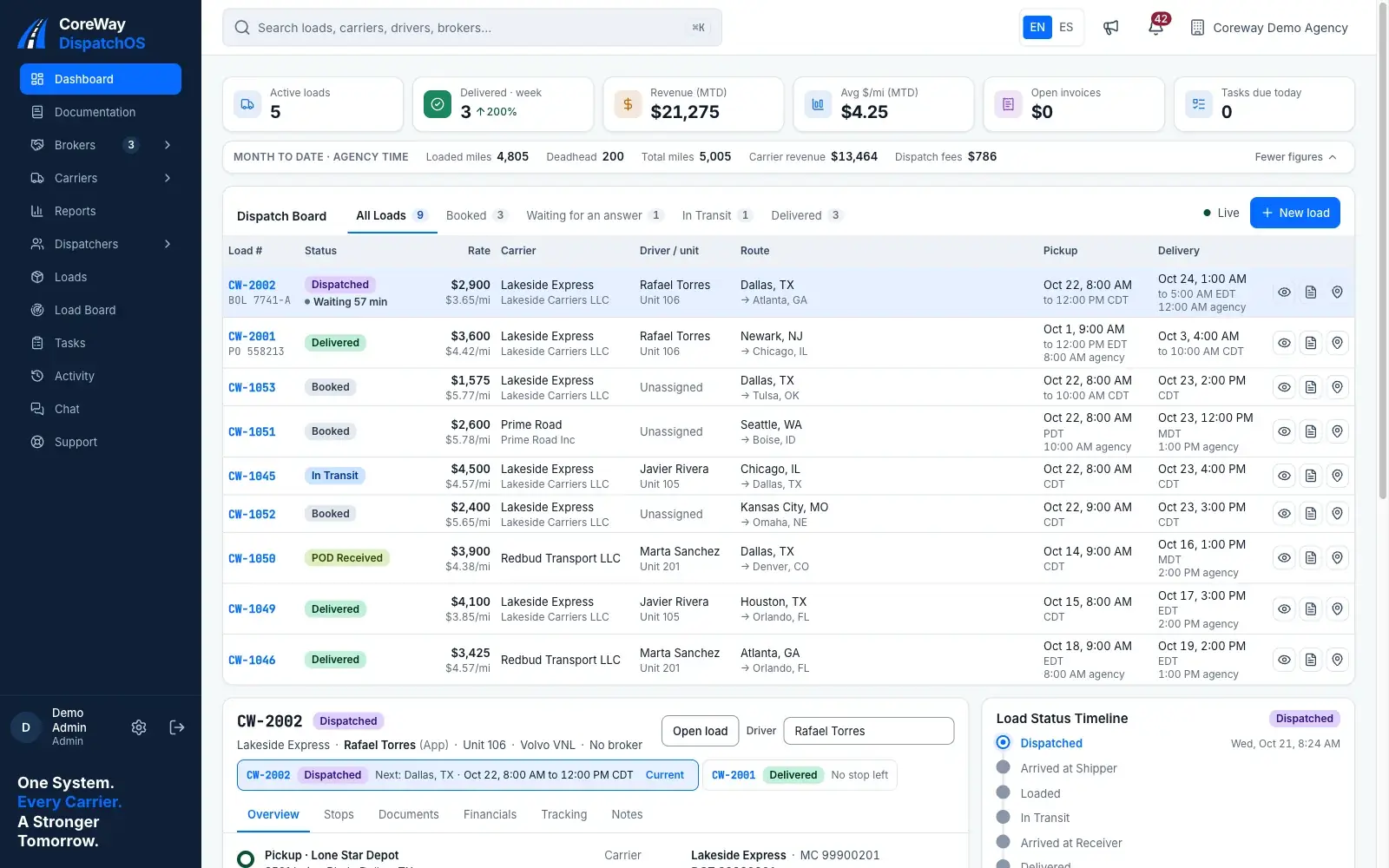
The work between the booking and the payment
Finding the load is the part you already do well. Coreway takes over everything that comes after it.
-
Loads live in group chats and a spreadsheet.
One board for every load
Status, truck, driver, stops and rate on one screen, for every dispatcher in the agency.
-
You find out late that a driver turned a load down.
The driver answers from the app
Accept or reject, with a reason. A rejected load comes straight back to your board.
-
BOL and POD arrive by text, late or blurry.
Documents stored with the load
Photographed at pickup and delivery from the driver's phone, filed with the load, ready for the invoice.
-
Month end is a reconciliation by hand.
Two ledgers close every load
What the broker owes the carrier and what the carrier owes the agency, with driver pay on the plan you set.
See Coreway in action
Thirty seconds of the real portal, then the whole flow screen by screen: the broker check, the load, the driver, the paperwork, the money and the reports. Every capture is a demo agency with fictional data.
-
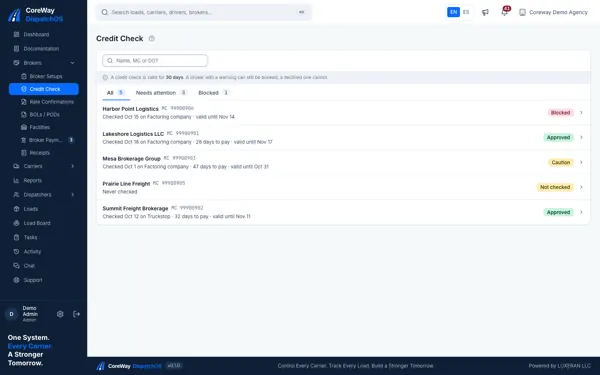
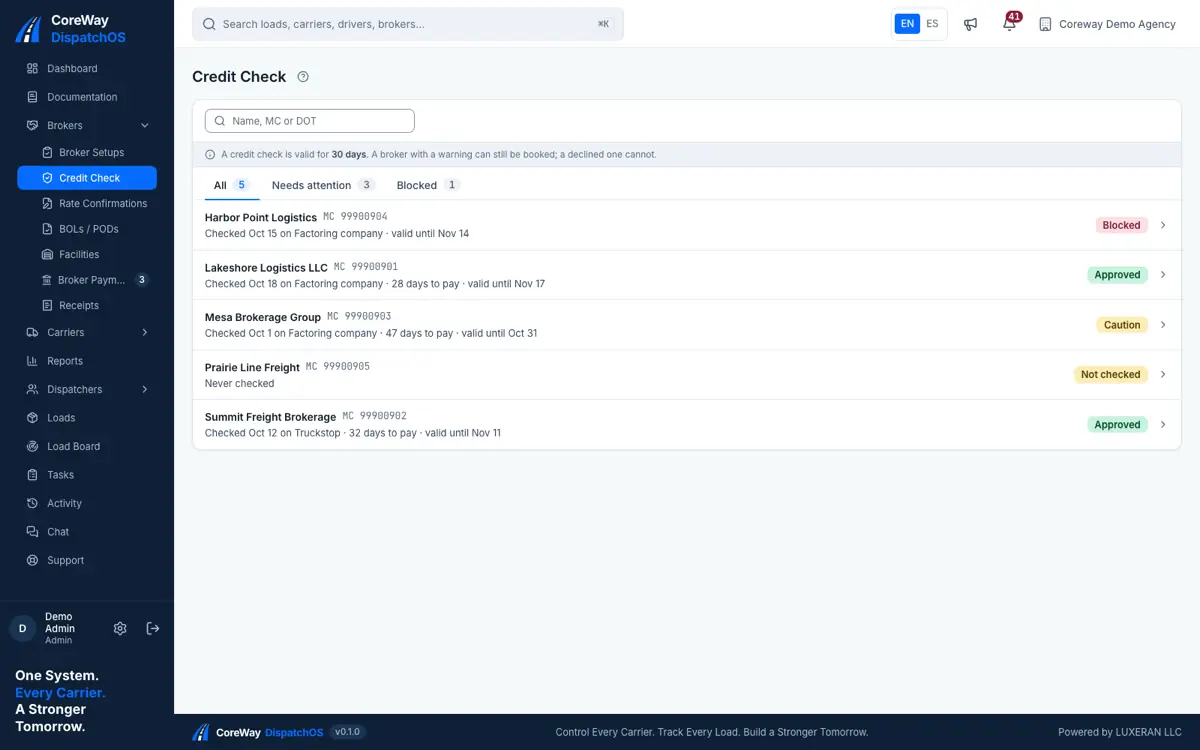
Check the broker before you commit a truck.
Every broker with its last credit check, who ran it, days to pay and until when it holds. A declined broker cannot be booked; a warning can, with your eyes open.
-
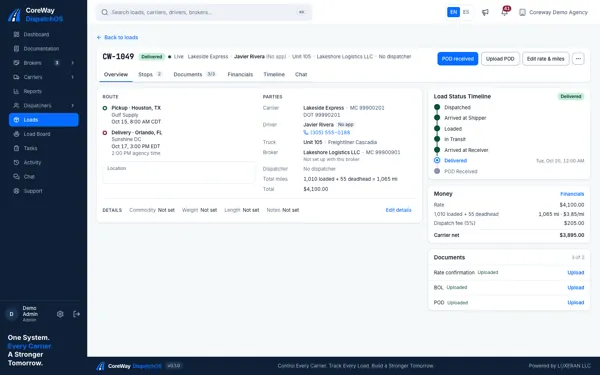
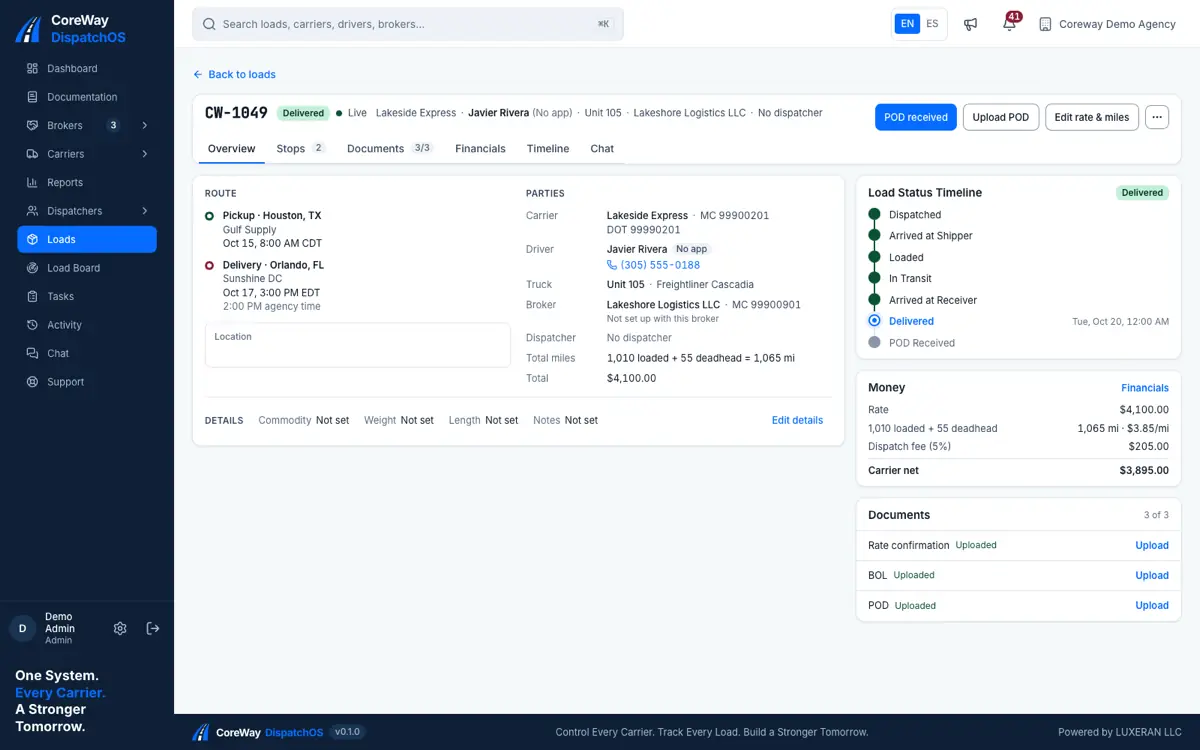
One load, one file.
Stops with their appointments, carrier, driver and truck, broker, miles and rate, the status timeline and the three documents the load needs, on one screen.
-
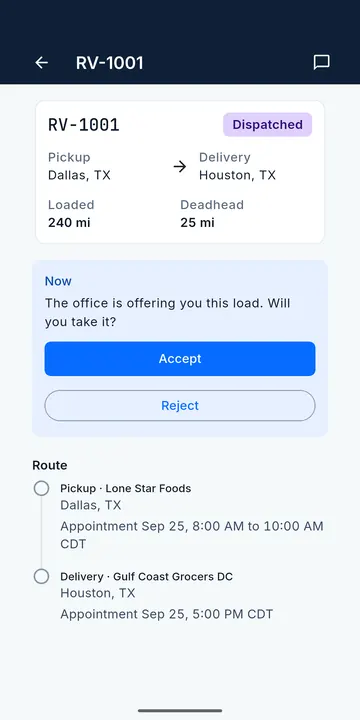
The driver answers from the phone.
The load reaches the driver as a push notification. Accept or reject with a reason; a rejection sends it straight back to your board.
-
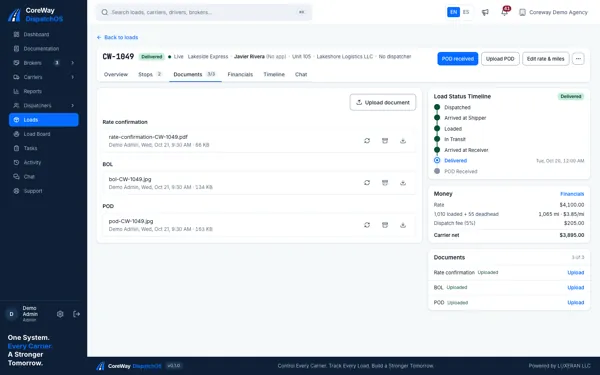
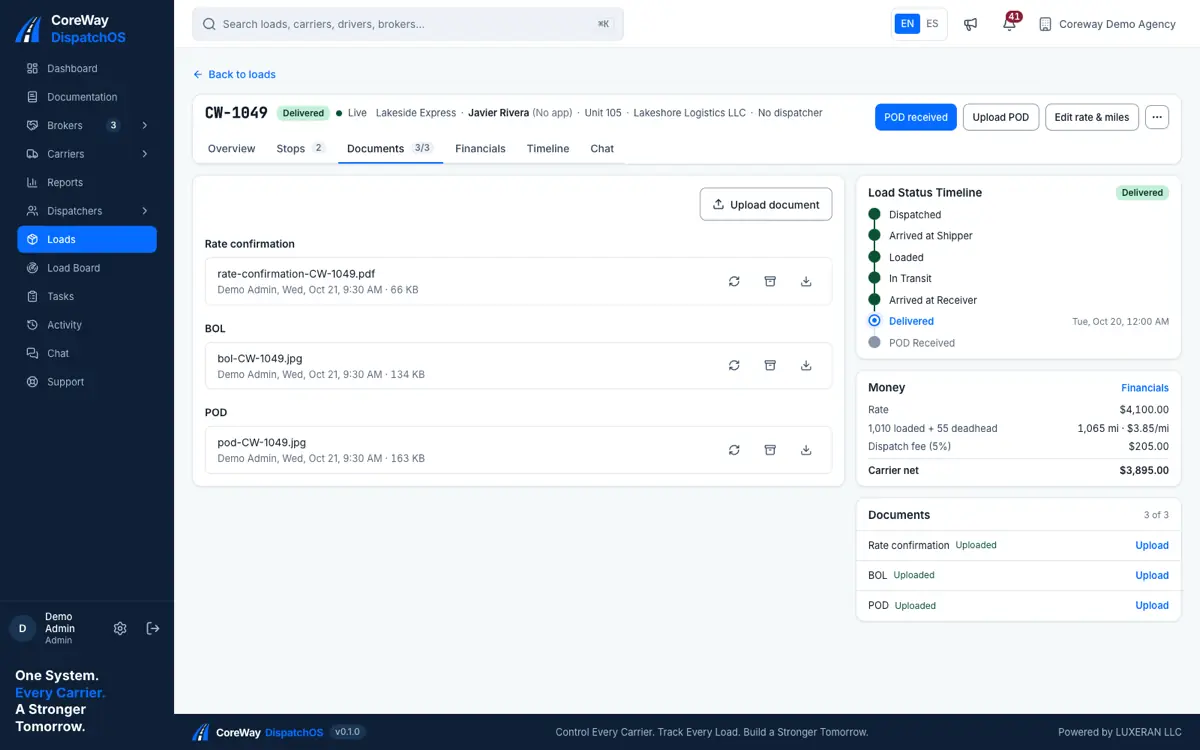
Rate confirmation, BOL and POD, filed with the load.
The BOL and the POD come from the driver’s camera at the stop; the rate confirmation from the office. Each file shows who uploaded it and when, ready for the invoice.
-
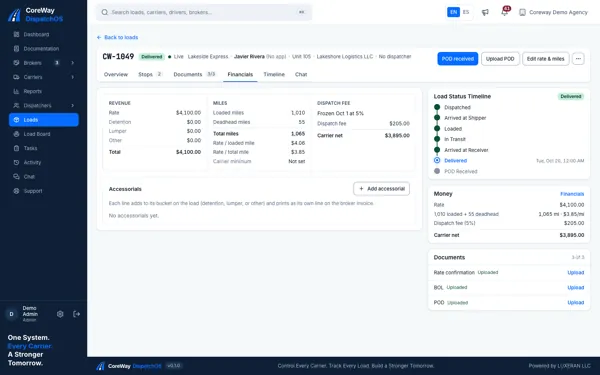
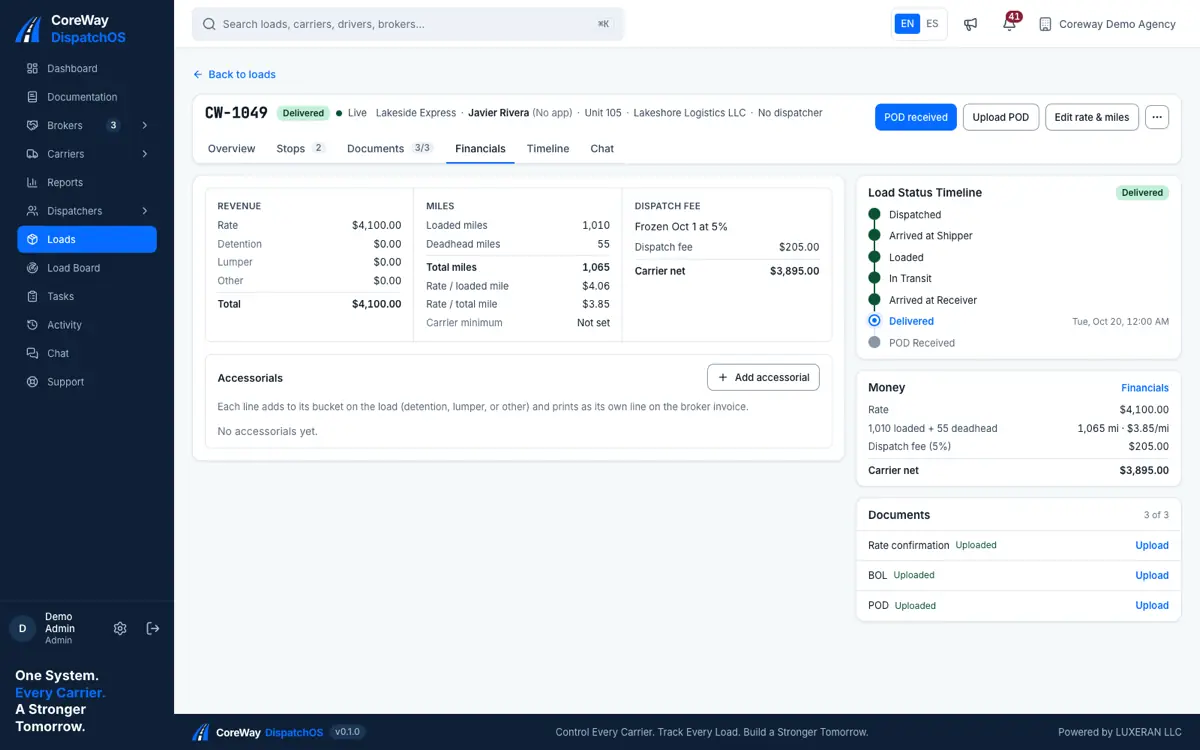
The money of the load, closed.
Rate, accessorials, loaded and deadhead miles, rate per mile, the dispatch fee at the percentage you set, and what the carrier nets. Two ledgers, one screen.
-
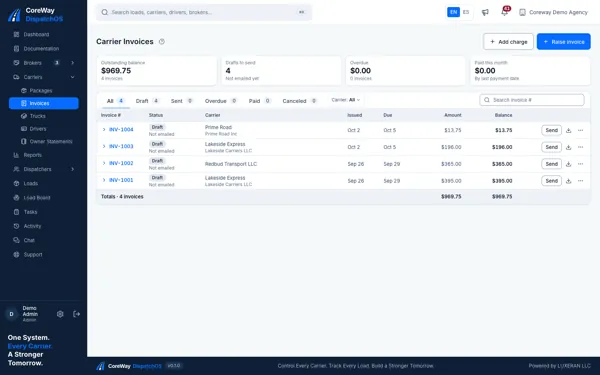
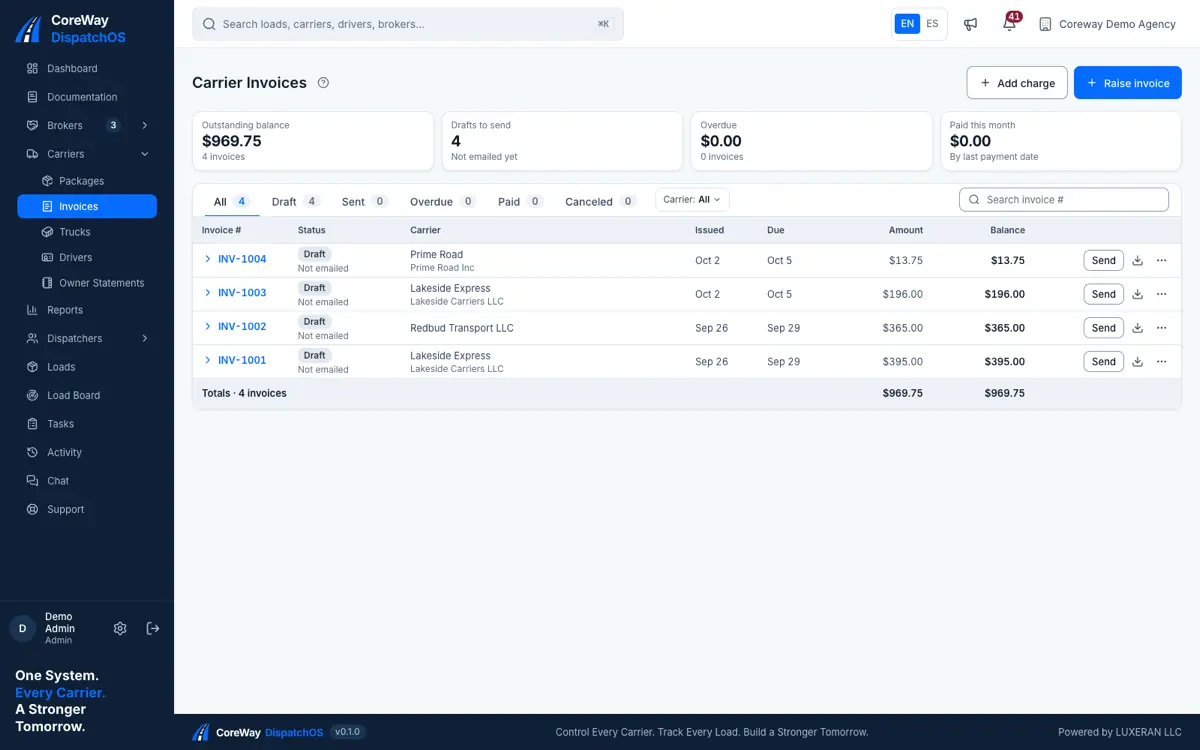
What each carrier owes the agency.
The agency ledger: one invoice per carrier and period with its dispatch fees, outstanding balance, drafts to send, overdue and paid this month.
-
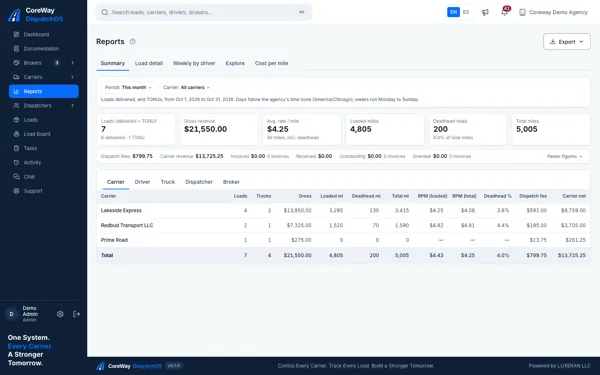
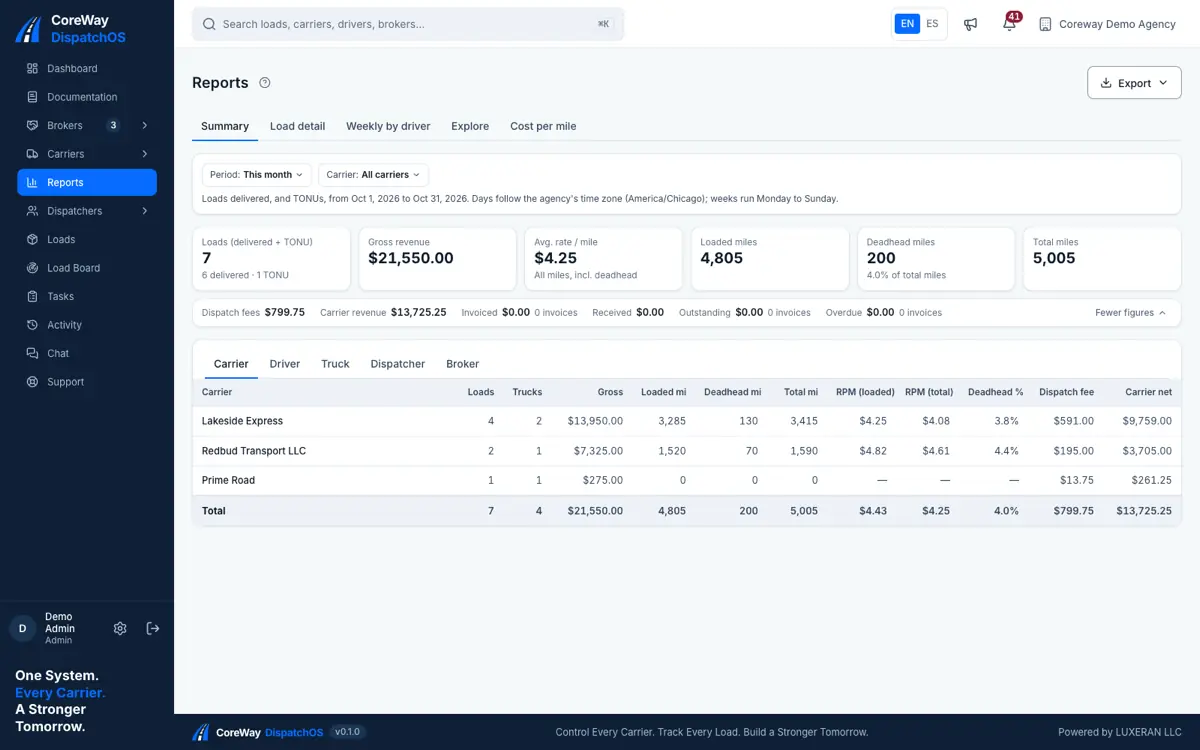
Know what each carrier earned this month.
Loads delivered, gross revenue, rate per mile, loaded and deadhead miles, dispatch fees and carrier net, by carrier, driver, truck, dispatcher or broker. Export when the carrier asks.
Try it on your own loads.
The driver side
One app, in English or Spanish. Drivers see the loads assigned to them, accept or reject them, mark their stops, upload the BOL and the POD from the phone, chat with the office, and see what they earned per load and when they get paid.
If you allow it, the app shares your location with your office only from the moment you accept a load until you deliver it. You can turn it off at any time in your phone settings.
Download the app and sign in with the invite code your agency sends you.
The App Store version is available in the United States and Canada.
-
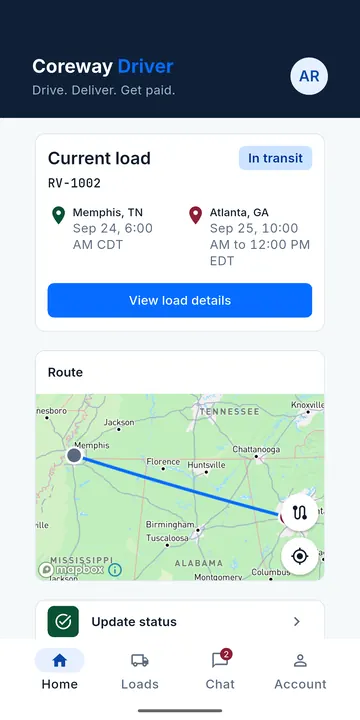
Your current load and its route -
Accept or reject a new load -
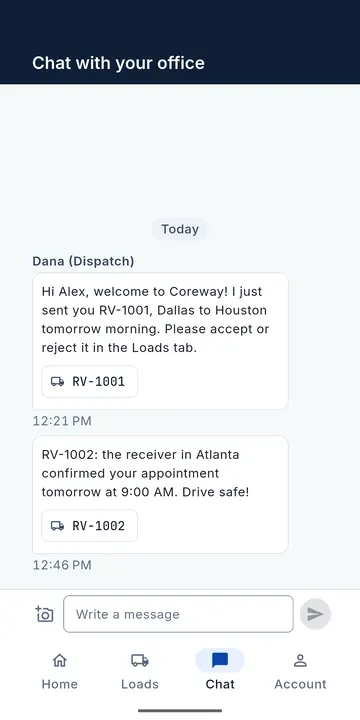
Chat with your office
How a load moves
Five steps from the rate confirmation to the ledger. The status names are the ones the portal and the app show.
-
Find
You book the load on the board, as you do today. Coreway starts when you have the rate confirmation.
-
Dispatch
Create the load: broker, load number, stops, rate, miles. Assign a truck and a driver. The driver gets a push notification.
Dispatched -
Accept
The driver accepts or rejects in the app, with a reason. A rejection sends the load back to you.
Accepted -
Deliver
Arrival and departure stamps at every stop. BOL at pickup, POD at delivery, photographed and stored with the load.
Delivered -
Settle
Two ledgers close the load: what the broker owes the carrier, what the carrier owes the agency. Driver pay follows your plan.
Settled
Works with what you already use
Coreway does not sell load board access. It connects to the tools your agency already pays for, and says plainly where it does not.
-
Certified
Truckstop Load Search
Search Truckstop from inside Coreway. Switched on carrier by carrier, with each carrier's own Truckstop account and Integration ID.
-
DAT
No integrationYou keep booking on DAT's own site. Coreway starts at the rate confirmation.
-
Google Play and App Store
AvailableThe driver app is on Google Play and the App Store. Drivers sign in with the invite code their agency sends them.
Certified means Truckstop reviewed this integration and approved it, in October 2026. Every search runs on the carrier's own Truckstop account: Coreway never resells load board data.
Pricing
One monthly price for the whole agency, set by how many active trucks you dispatch. The same product on every plan, with no charge per dispatcher or per driver.
-
Basic
1 to 5 trucks
$49 per month
Start free trial30 days free, no card
-
Medium
6 to 12 trucks
$79 per month
Start free trial30 days free, no card
-
Gold
13 to 25 trucks
$149 per month
Start free trial30 days free, no card
-
Enterprise
26 or more trucks
Custom price
Contact usWe agree the price with you and set it on your account.
You never pick a plan. It follows your active trucks.
Every plan includes the whole product
- The dispatcher portal for the whole office, with no charge per dispatcher.
- The driver app on Google Play and the App Store, with no charge per driver.
- Rate confirmation, BOL and POD kept on every load.
- Two ledgers: what the broker owes the carrier and what the carrier owes you.
- Certified Truckstop Load Search, on the carrier's own account.
- English and Spanish, and email support on business days.
30 days free, on the full product
Every new agency starts with a 30-day free trial. No card is needed to start it.
- Nothing is charged until you add a payment method.
- Every plan and every feature, from day one.
- To keep going after the trial, add a payment method. The plan that fits your trucks applies.
Prefer a guided tour first?
Ask for a demo by email and we typically reply within one business day, in English or Spanish.
Request a demo- A truck counts when it is active and its carrier is active. Your plan follows the highest count in the billing month. If it changes, the new plan starts at your next renewal, with no prorated charges between renewals.
- Prices are in US dollars, billed monthly in advance through our payment processor. Taxes are not included.
Questions agencies ask before signing up
What does it cost?
It depends on how many active trucks your agency runs. Plans start at $49 a month for the whole agency, with no charge per dispatcher or per driver, and with 26 or more trucks we agree the price with you. Every new agency starts with a 30-day free trial. The full list is under Pricing on this page.
Do I need a card to start the trial?
No. You create your agency, use the full product for 30 days, and nothing is charged until you add a payment method.
What happens when the trial ends?
To keep using Coreway you add a payment method, and the plan that matches your active trucks applies from then on. Nothing is charged automatically, because no card was taken to start the trial.
Can I cancel?
Yes, at any time, effective at the end of the current paid month. For 30 days after your account ends you can ask us to export your agency's data, as data files and the original documents. The terms of service say exactly how.
Do I still need DAT or Truckstop?
Yes. Coreway does not sell load board access. Our Truckstop Load Search integration is certified, and every search runs on the carrier's own account: an active Truckstop account with Freight Match Pro (Carrier or Combo), plus the Load Search Web Service license or the API bundle. Truckstop gives each carrier its own Integration ID, and we switch search on for a carrier once that ID is in place. DAT you keep using on its own site.
How do my drivers get the app?
From Google Play or the App Store, free. A driver signs in with the invite code the agency sends; there is no self-signup for drivers. The App Store version is available in the United States and Canada.
Is it in Spanish?
Yes. The dispatcher portal, the driver app and this site are in English and Spanish, and support answers in both.
Who can use it?
A dispatch agency and its team, the carriers it dispatches for, and their drivers. Every driver account belongs to an agency.
Does it track drivers?
Only if the driver allows it, and only from the moment the driver accepts a load until delivery. The phone shows that location is in use while it runs in the background, and the driver can turn it off in the phone settings. Only the agency's office sees it.
How do I get started?
Use the Start free trial button to create your agency. It takes a few minutes, needs no card, and your 30-day free trial starts the same day. Prefer to see it first? Request a demo and we reply by email.
About Coreway
A small company, a real product and plain facts. What we are, where the product stands and how to reach us.
-
Who makes it
Coreway is built and operated by LUXERAN LLC, a Florida limited liability company based in Tampa, Florida, founded in 2026. The same company publishes the driver app on Google Play and the App Store.
-
Where it stands
Live with its first agencies since September 2026. Any agency can create its own workspace and start a 30-day free trial today. The driver app is on Google Play and the App Store. The Truckstop Load Search integration is certified; DAT has no integration.
-
Support
By email, in English or Spanish, Monday to Friday from 9:00 to 17:00 US Eastern Time, except US federal holidays. We typically send a first reply within one business day.
Run your next load in Coreway.
Create your agency in a few minutes and use Coreway free for 30 days. No card needed.
30 days free. No card.
Start free trial